10 Family Vacation Planning Template Resources
October 7, 2026·MyPerfectStay
One person wants a polished itinerary with restaurant links and daily timing. Another wants a printable packing sheet and a page they can stick on the fridge. The children want a say in activities, grandparents need realistic walking distances and rest periods, and the person paying for the accommodation wants to know which “small extras” will push the trip over budget.
That's why the best family vacation planning template depends on more than the destination. Group size, trip complexity, collaboration needs, and access requirements all matter. A city break in Paris with two adults needs a different planning base from a multigenerational trip through Rome, Dubrovnik, and Santorini. A shared digital workspace may suit one family, while a one-page PDF works better for relatives who don't want another app.
The options below are compared by the workflow they support best: shared itinerary building, printable distribution, budget coordination, task delegation, or a fast trip overview. Choose the planning base first. Then add destination details, accommodation, transport, costs, activity preferences, and booking deadlines. If the family can't agree on activities, use the template for structure and a group decision workflow such as MyPerfectStay to collect private preferences before locking the itinerary.
Table of Contents
- 1. Notion Trip Planner
- 2. Smartsheet Free Itinerary Templates
- 3. Canva Itinerary and Family Vacation Planner Templates
- 4. Trello Vacation Planning
- 5. Template.net Family Vacation Itinerary Template
- 6. MobiSystems Family Travel Planner
- 7. ItinerarySheets Family Vacation Itinerary Template
- 8. TravelItineraryTemplate.org Family Vacation Itinerary
- 9. PlannerPaper Family Vacation Planner
- 10. FreeTravelItinerary.com Family Vacation Itinerary
- Top 10 Family Vacation Planning Template Comparison
- Turn the Template Into a Shared Trip Plan
1. Notion Trip Planner
Notion's official Trip Planner template is the strongest choice for families that want one living document rather than a folder of disconnected files. It can hold a trip overview, accommodation notes, booking information, packing tasks, and a day-by-day itinerary in the same workspace.
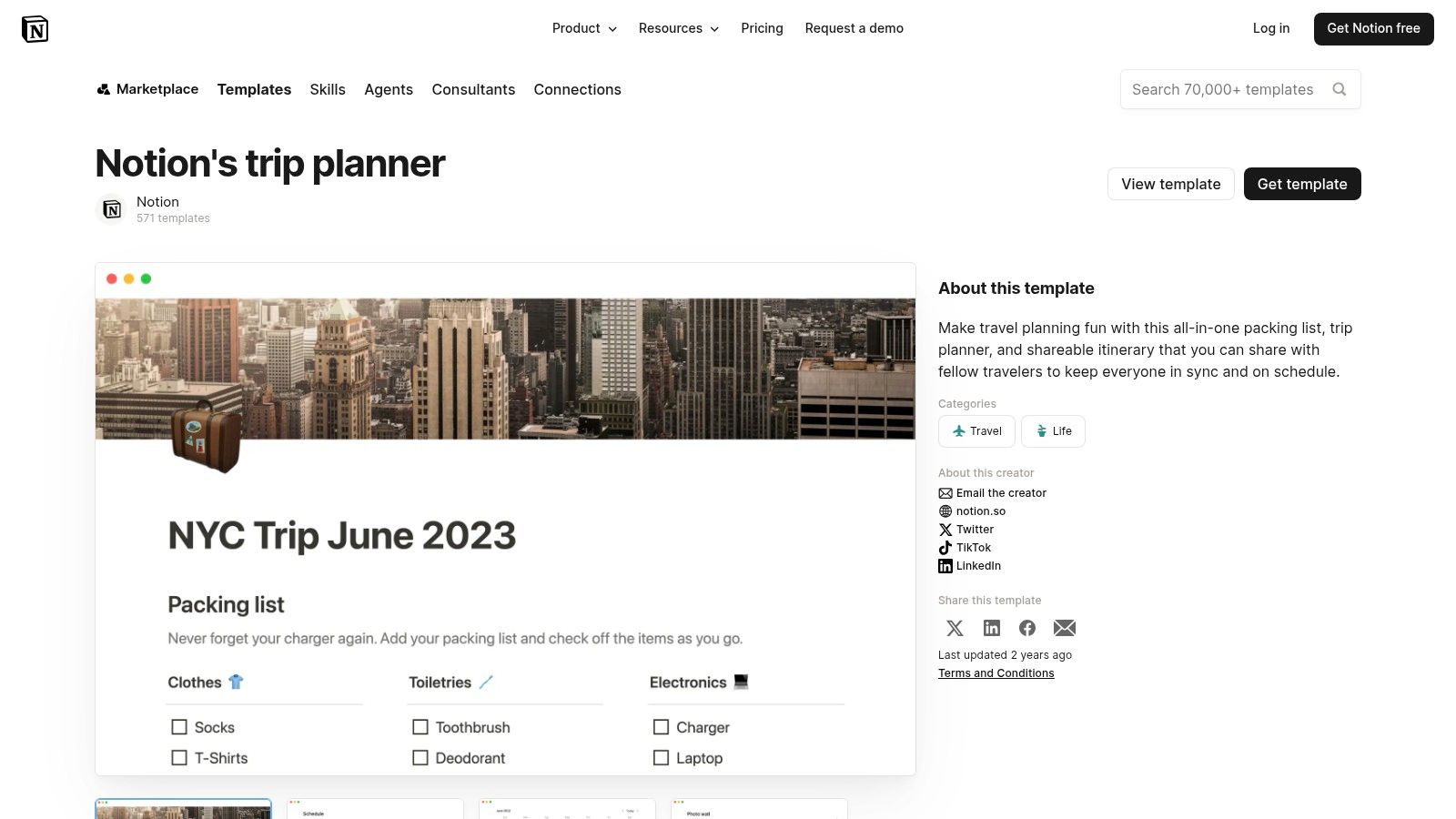
Best for a shared itinerary
Notion works particularly well when the itinerary will keep changing. Create a page for Paris, Rome, or each stop on a longer European trip, then add daily pages beneath it. Databases, tags, and filters can separate confirmed bookings from ideas, or show activities by location, cost category, and participant.
The flexibility comes with setup work. A parent who understands Notion can create a clean system, but a relative who only wants to see the departure time may find databases and linked views excessive. Offline access is also more limited than the experience of a dedicated document or printed sheet, so download or print the essentials before travelling.
Practical rule: Use Notion as the planning source of truth, then create a simple offline summary for travellers who won't regularly open the workspace.
The template is useful for creating a trip itinerary, especially when each day needs links, notes, maps, and booking confirmations. It pairs well with MyPerfectStay when the family needs to decide which activities belong in those daily pages. Collect private preferences first, vote on shared options, and transfer the agreed choices into Notion instead of turning the workspace into a debate thread.
2. Smartsheet Free Itinerary Templates
Families that prefer familiar files should start with Smartsheet's free itinerary templates. The collection includes a dedicated Family Vacation Itinerary and formats such as Word, Excel, Google Docs, and PDF. That range matters when one person edits on a laptop while another expects a printable handout.
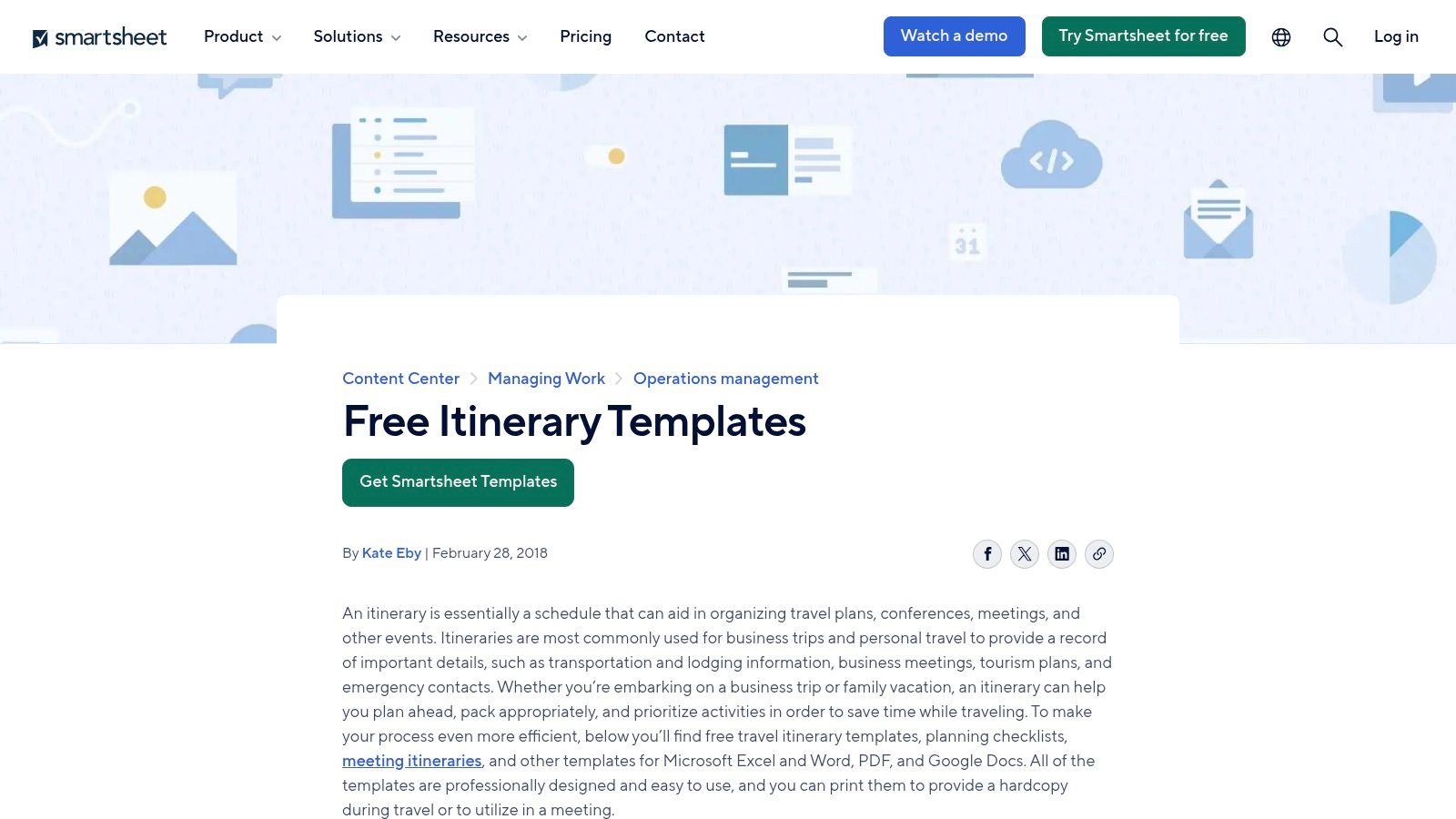
Best for printable distribution
The family layout gives parents a straightforward place to record accommodation, activities, confirmations, and schedule details. It doesn't require the whole group to learn a new planning system. Print a copy for grandparents, save a PDF for offline access, and give the main organiser an editable version for updates.
The trade-off is collaboration. A downloaded Word or Excel file becomes a static document, and multiple versions can quickly appear in family chats. Live editing is possible when the file is opened in a cloud editor, but the experience depends on everyone using the same shared file and respecting the editing process.
Use clear status labels such as “idea,” “shortlist,” “booked,” and “cancelled.” Add a separate notes area for mobility considerations, meal preferences, and the latest arrival time. That keeps the itinerary useful without trying to turn a simple document into a complete project-management system.
For practical preparation, combine the file with how to plan a family vacation guidance and use MyPerfectStay for activity agreement. The Smartsheet document can remain the printable distribution copy, while private surveys and group voting help determine which activities deserve a confirmed place.
3. Canva Itinerary and Family Vacation Planner Templates
Canva's itinerary templates suit families that care about presentation as much as information. Its browser editor makes it easy to personalise layouts with photographs, icons, colour coding, and custom fonts. The result can feel more like a designed travel booklet than an administrative schedule.
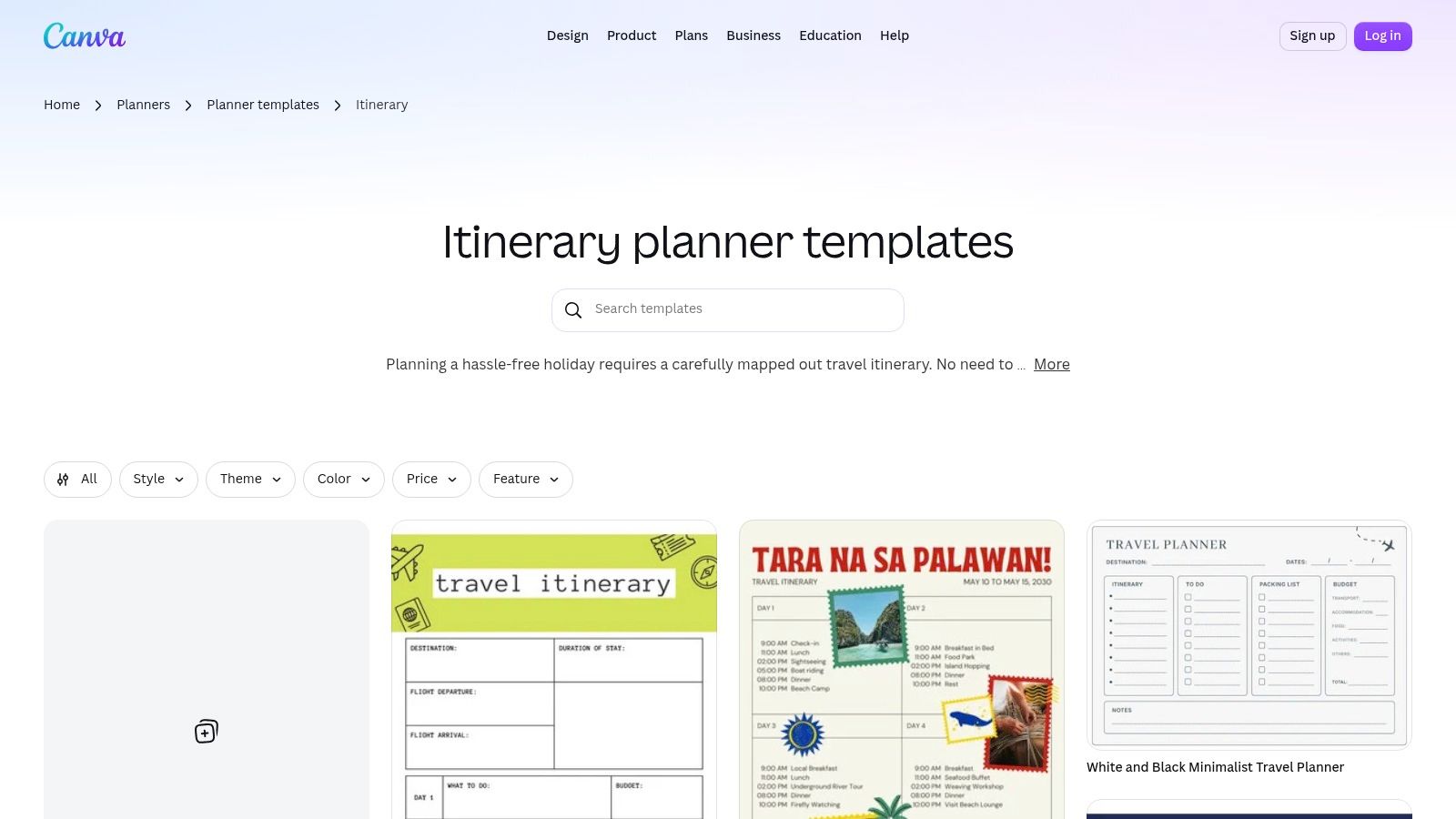
Best for a polished handout
A Canva planner is useful for a family reunion in Lisbon, a milestone trip to Vienna, or a multi-stop itinerary where everyone appreciates visual cues. Add a photo for each destination, use icons for meals and transport, and export the finished pages to PDF or PNG for printing and mobile sharing.
Team collaboration and commenting can support input during preparation, but Canva isn't a budgeting system. It won't replace a spreadsheet when the organiser needs formulas, cost comparisons, or a clear record of who owes what. Some templates and design assets may also require Canva Pro, so check the chosen layout before building the entire plan around it.
Keep the design restrained. A beautiful itinerary that hides the train platform, check-in time, or emergency contact details has failed its practical job. Use one page for the visual overview and a separate, less decorative page for booking references, addresses, and contingency notes.
Canva works best after the family has already agreed on the content. MyPerfectStay can help collect preferences and vote on activities before the organiser turns the final choices into a polished document. That division keeps Canva focused on communication and presentation rather than trying to resolve every disagreement inside a design file.
4. Trello Vacation Planning
Trello's travel planning resources take a different approach. Instead of starting with a finished itinerary, Trello uses a board with lists and cards. Families can create columns for ideas, destinations, bookings, packing, and daily plans, then move cards through the workflow as decisions become final.
Best for delegating tasks
Trello is a good fit when several people need to do different jobs. Assign one card to the person checking flights, another to the relative comparing family-friendly accommodation in Amsterdam, and another to the teenager responsible for collecting museum ideas. Checklists, due dates, comments, and attachments keep those tasks visible.
The board is visual and adaptable, but it isn't an out-of-the-box family itinerary printout. Someone must decide how the lists should work, add the relevant cards, and create a final daily view. Without those rules, the board can become a graveyard of attractive ideas and unfinished tasks.
A useful structure might include:
- Destination ideas: Add the city, travel dates under consideration, and the reason it suits the group.
- Researching: Attach accommodation, transport, and activity links while keeping alternatives together.
- Booked: Move only confirmed items here, with confirmation files attached to the card.
- Packing and preparation: Assign documents, medication, luggage, and family-specific tasks to named people.
Trello handles responsibility better than consensus. Use MyPerfectStay alongside it when the issue is not “who will research this?” but “which activity does everyone want?” Once the family votes, Trello can hold the agreed booking task and deadline.
5. Template.net Family Vacation Itinerary Template
Template.net's Family Vacation Itinerary Template is designed for a quick start. It offers family-specific layouts that can be opened in Google Docs, Word, Excel, or Sheets, with options for PDF output. Families that don't want to build formatting from a blank page can enter their details and start refining the plan.
Best for a fast structured itinerary
The main advantage is reduced setup. A parent can add flights, accommodation, meal ideas, activities, and child-focused notes without designing the document structure first. The availability of both document and spreadsheet formats also makes it easier to choose between a narrative itinerary and a more sortable planning sheet.
Inspect the file before distributing it. Branding elements, placeholder text, or layout details may need cleaning up. Access to particular assets or templates may also depend on sign-in or subscription conditions. Those aren't reasons to reject the resource, but they are reasons to avoid promising the family a finished handout before checking the export.
The template is strongest for a group that has mostly settled its destination and wants a presentable schedule. It is less effective as a decision-making tool because it gives the family a place to record choices, not a mechanism for comparing competing budgets, activity intensities, or must-see requests.
For cost preparation, connect it with the Family Vacation Budget Planner. MyPerfectStay can also gather each traveller's private budget and interests, identify overlapping activity choices, and support a vote. The completed Template.net file can then serve as the practical itinerary distributed to the group.
6. MobiSystems Family Travel Planner
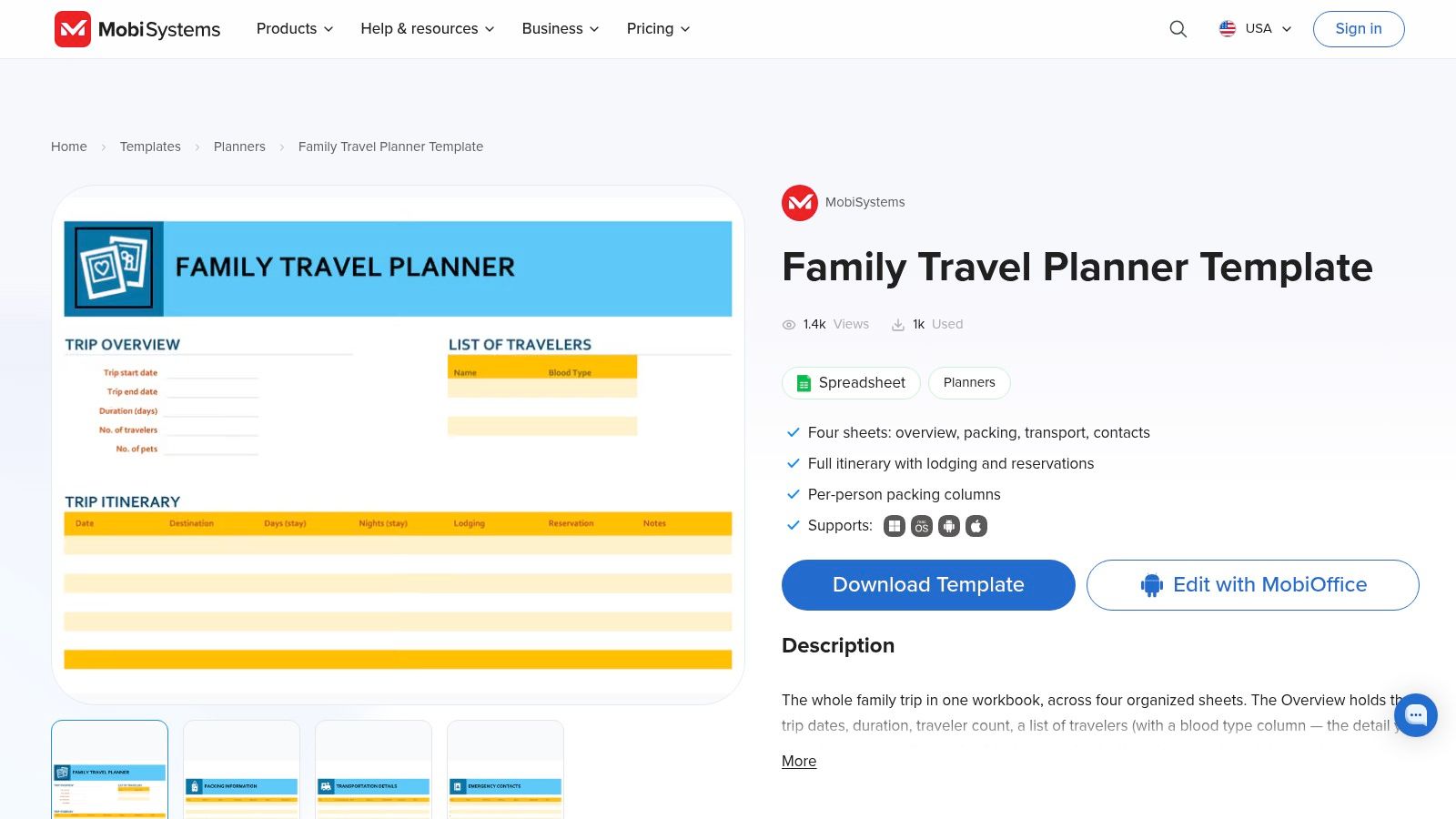
MobiSystems' Family Travel Planner uses Excel as its foundation. It brings together the trip overview, itinerary, reservations, transportation information, and traveller details in one workbook. Families already comfortable with spreadsheets won't need to learn a new interface before entering confirmations and contact information.
Best for confirmations and traveller details
A spreadsheet is practical when the organiser needs to sort information and keep exact references in view. Add booking numbers, accommodation addresses, transport details, emergency contacts, and the names of travellers in dedicated fields. Excel formulas can help organise trip data, although the workbook remains dependent on the user maintaining it carefully.
The format also prints cleanly for relatives who prefer paper. Collaboration is better through OneDrive or Google Drive than through emailed attachments, but even shared spreadsheets require discipline. Decide who edits the master file and ask everyone else to submit changes in comments or a defined planning channel.
This planner isn't the most visually engaging option. It may feel too functional for children or relatives who want a colourful day-by-day guide, and it doesn't naturally create a group voting process. Its strength is record keeping, not inspiration.
Use MyPerfectStay before filling the final activity rows. A private survey can capture budget, interests, energy level, and must-see ideas, while voting can reduce a long list to activities the family supports. Then enter only the agreed options into the workbook, leaving Excel to manage confirmations and operational detail.
7. ItinerarySheets Family Vacation Itinerary Template
ItinerarySheets' Family Vacation Itinerary Template takes a utilitarian approach to the daily schedule. It is available in Excel, Google Sheets, and PDF, with family-oriented sections that make it suitable for multi-stop trips and repeat use.
Best for a clear day-by-day view
The appeal is speed and clarity. Put each day in order, add the destination, transport, meals, activities, and notes, then duplicate the structure for a future journey. A family travelling from Barcelona to Rome can see the sequence of days without navigating a complex database or decorative page layout.
That simplicity also defines the limitation. Advanced automation, budget calculations, and complex filtering aren't the focus. The styling is functional rather than editorial, so the finished file may need a separate cover page or summary sheet if it will be handed to children, grandparents, or a larger reunion group.
ItinerarySheets is particularly useful once the group has made its major choices. Use a separate decision process for the earlier stage, when travellers are still comparing pace, activity types, and optional excursions. MyPerfectStay can collect those preferences and expose the shared matches, leaving this template to document the result.
Print a copy for each household or create one shared Google Sheets file. Keep booking confirmations in a separate folder or attach links in the relevant rows, and mark uncertain plans clearly. A day-by-day template works only when the group can distinguish a confirmed reservation from an appealing possibility.
8. TravelItineraryTemplate.org Family Vacation Itinerary
TravelItineraryTemplate.org's family itinerary templates provide several formats in one pack, including PDF, Word, Excel, and Google Sheets. That makes the resource useful for families with mixed preferences. One person can edit the spreadsheet, another can print the PDF, and a caregiver can receive a document with the essential schedule.
Best for mixed-format families
Colour-coded daily cards can separate activities, meals, and notes in a way that's approachable for children. Kid-friendly sections also make it easier to distribute a simplified version without exposing every booking note or budget discussion. For a group including grandparents, parents, and young travellers, that flexibility is more valuable than a single perfect interface.
The pack remains fairly basic compared with design-focused tools. It won't provide the same visual polish as Canva or the same workflow depth as Notion or Trello. It also has fewer spreadsheet functions, so use another system for complicated cost allocation or detailed booking management.
A sensible arrangement is to maintain one editable master file and export a PDF only after the itinerary is approved. Don't let relatives edit several formats at the same time. That creates uncertainty about which version contains the latest restaurant reservation or airport transfer.
MyPerfectStay complements this template at the agreement stage. Families can privately record interests and energy levels, vote on activities, and then place the selected options into the colour-coded daily plan. The template handles distribution well, while the group workflow handles the reasons behind each choice.
9. PlannerPaper Family Vacation Planner
PlannerPaper's Family Vacation Planner is deliberately small in scope. The printable single-page layout captures the destination, dates, budget, and to-dos, giving the family a visible overview without requiring an account, a board, or a shared document.
Best for a fast trip overview
This is the option to choose when the family needs alignment before detailed planning begins. Put the possible destination, travel dates, broad budget, and the next tasks where everyone can see them. A fridge, noticeboard, or household folder can work better than another link in a busy chat.
The limitation is intentional. A single page can't replace a day-by-day itinerary, reservation register, packing list, or shared activity vote. It also doesn't track changes automatically, so the organiser needs to update the page when the destination or dates change.
Use it as the front page of a larger system rather than forcing it to carry the whole trip. Pair the overview with a spreadsheet for costs and confirmations, a board for assigned tasks, or a digital workspace for detailed daily notes. The page should answer “What are we planning?” at a glance, not “Where is every traveller at 3 p.m. on the fourth day?”
MyPerfectStay can supply the collaborative layer that this printable sheet lacks. Gather private preferences, surface overlapping activities, and vote before writing the agreed destination and priority experiences onto the page. The result gives the family a simple visible commitment without pretending that one sheet can manage every detail.
10. FreeTravelItinerary.com Family Vacation Itinerary
FreeTravelItinerary.com's family vacation itinerary starts as a CSV designed for import into Google Sheets. That makes it a useful option for families that want a lightweight shared spreadsheet, especially when cost tracking across destinations is more important than visual presentation.
Best for budget coordination
After importing the CSV, the family can adapt the rows for destinations, transport, accommodation, meals, and activities. Google Sheets supports live editing, so several people can work from the same file instead of passing attachments around. The structure can also be copied for each day or stop on a longer itinerary.
The initial setup needs more attention than a ready-made PDF. The organiser must import the data, rename or rearrange fields, add formulas where needed, and decide how costs will be recorded. Families that aren't comfortable with Google Sheets may prefer MobiSystems or a document-based template.
Use separate columns for estimated cost, confirmed cost, payer, shared or optional status, and payment state. This prevents the common mistake of treating an attractive itinerary as affordable just because the main accommodation price is visible. Keep taxes, transport, meals, and activity charges in the same planning view wherever possible.
The template works well after MyPerfectStay has helped the family narrow its activity choices. Private inputs and voting can establish which tours, museums, food experiences, or cruises have genuine group support. The spreadsheet can then track the selected options and show the practical cost of adding or removing them.
Top 10 Family Vacation Planning Template Comparison
| Tool | Core features | UX ★ | Best for 👥 | Standout ✨/🏆 | Price 💰 |
|---|---|---|---|---|---|
| Notion – Trip Planner (official template) | Centralized itinerary, day pages, customizable DBs | ★★★★ | 👥 Families comfortable with Notion | ✨ Flexible databases & real‑time collab | 💰 Free (Notion account) |
| Smartsheet – Free Itinerary Templates | Word/Excel/Google/PDF print‑ready templates | ★★★ | 👥 Parents who prefer printable docs | ✨ Multi‑format, print‑ready layouts | 💰 Free |
| Canva – Itinerary/Family Planner | Drag‑drop editor, photos, templates, export PDF | ★★★★ | 👥 Design‑focused families | 🏆 Polished, fast to personalize | 💰 Free + Pro assets |
| Trello – Vacation Planning (boards) | Kanban boards, checklists, due dates, attachments | ★★★★ | 👥 Task‑delegating families | ✨ Visual task management for delegating | 💰 Free / Paid upgrades |
| Template.net – Family Itinerary | Multi‑format editable templates (Docs/Sheets) | ★★★ | 👥 Users wanting quick plug‑and‑play setup | ✨ Fast setup across doc & sheet formats | 💰 Free / Some gated content |
| MobiSystems – Family Travel Planner (Excel) | Excel workbook: itinerary, reservations, contacts | ★★★ | 👥 Excel‑comfortable planners | ✨ Consolidated file with formulas | 💰 Free |
| ItinerarySheets – Family Itinerary | Spreadsheet + printable daily schedule templates | ★★★ | 👥 Families doing multi‑stop trips | ✨ Easy duplication for repeat trips | 💰 Free |
| TravelItineraryTemplate.org – Family Pack | PDF/Word/Excel/Sheets + color‑coded daily cards | ★★★ | 👥 Families sharing with caregivers/relatives | ✨ Kid‑friendly, color‑coded printouts | 💰 Free |
| PlannerPaper – Family Vacation Planner (printable) | Single‑page overview (dates, budget, to‑dos) | ★★ | 👥 Families wanting a fridge‑overview | ✨ Instant one‑page snapshot | 💰 Free |
| FreeTravelItinerary.com – CSV/Sheets | CSV import for Sheets, cost tracking layout | ★★★ | 👥 Budget‑focused co‑editing families | ✨ Budget tracking via Sheets import | 💰 Free |
| Template.net – Family Vacation Itinerary (duplicate) | Structured, printable templates in multiple formats | ★★★ | 👥 Doc/spreadsheet users wanting structure | ✨ Plug‑and‑play family layout | 💰 Free / Subscription |
Turn the Template Into a Shared Trip Plan
The right template depends on the decision you need to make first. Choose a one-page printable when the family needs a quick overview of destination, dates, budget, and immediate tasks. Choose a spreadsheet when costs, confirmations, transport details, and payer responsibilities need careful tracking. Choose a board when the main problem is delegated research and preparation. Choose a flexible workspace when the itinerary will change frequently and needs links, notes, daily pages, and shared editing.
Don't treat the template as the planning process itself. It is a container for decisions. Add each traveller's preferred pace, energy level, activity interests, must-see ideas, dietary requirements, mobility constraints, and sleep considerations before filling every day with bookings. A family plan that records only destinations and times can still fail when one traveller can't manage the walking route or another has no interest in the selected activities.
Budget fields deserve the same attention. Record the total ceiling, individual limits where contributions differ, currency, fixed costs, optional costs, and who pays each shared expense. Show the full expected cost rather than only the headline booking price. This makes it easier to compare a kitchen-equipped apartment in Lisbon with a hotel that adds restaurant meals, or a central stay in Paris with a cheaper option that creates longer daily transfers.
Agreement is often harder than formatting. MyPerfectStay can collect private inputs from each traveller, including budget, interests, energy level, and must-see ideas. Its group workflow can identify overlapping preferences, support voting on destinations and activities, and produce a shared draft itinerary. That approach is useful when children, parents, and older relatives all need a voice but don't want to negotiate every preference in a group chat.
Use the selected template for the operational layer:
- Assign ownership: Give one person responsibility for accommodation, another for transport, another for activities, and another for documents or medical requirements.
- Set decision deadlines: Mark when the family must choose the destination, confirm the accommodation, reserve timed activities, and complete travel documents.
- Separate ideas from commitments: Label every item as a suggestion, shortlist option, pending vote, booked reservation, or cancelled plan.
- Build recovery space: Leave room for meals, rest, delays, weather changes, and individual opt-outs instead of scheduling every hour.
- Confirm the master copy: Decide whether Notion, a shared sheet, Trello, or a final PDF is the source of truth.
- Distribute the final plan: Send the editable link to organisers and a simple offline copy to relatives who need quick access.
- Review before departure: Check names, dates, addresses, confirmation numbers, payment responsibilities, accessibility needs, and emergency contacts.
A shared plan doesn't require everyone to follow the same activity every day. A museum morning for some travellers, a slower café stop for others, and one agreed family meal can be fairer than forcing the entire group through an exhausting schedule. The template should make those choices visible, not conceal them under a polished layout.
Select the format that matches your family's real behaviour, then connect it to a decision process that gives every traveller a practical way to contribute. Once the group has agreed, keep the final itinerary concise enough to use during the trip and detailed enough to prevent repeated questions.
MyPerfectStay helps families collect private preferences, compare shared interests, vote on activities, coordinate budgets, and organise the chosen plans into a shared itinerary. Use it alongside your preferred family vacation planning template to turn competing ideas into confirmed decisions, then visit MyPerfectStay to start planning the trip together.